Password Policy
When several people work in the same MagicINFO Server, a server-wide password policy helps keep the accounts secure. The policy can force users to renew their passwords periodically, block the reuse of old passwords, and require two-step verification (2FA) at sign-in.
Password requirements
MagicINFO Server accepts passwords that are:
- between 10 and 50 characters long, and
- a combination of letters, numbers, and symbols.
Encourage users to pick complex passwords or passphrases and to keep them in a password manager rather than reusing the same password across systems.
Configure the policy
Only a server administrator can change the policy. Go to Setting > Server Management > Server Settings and locate the Password Policies section.
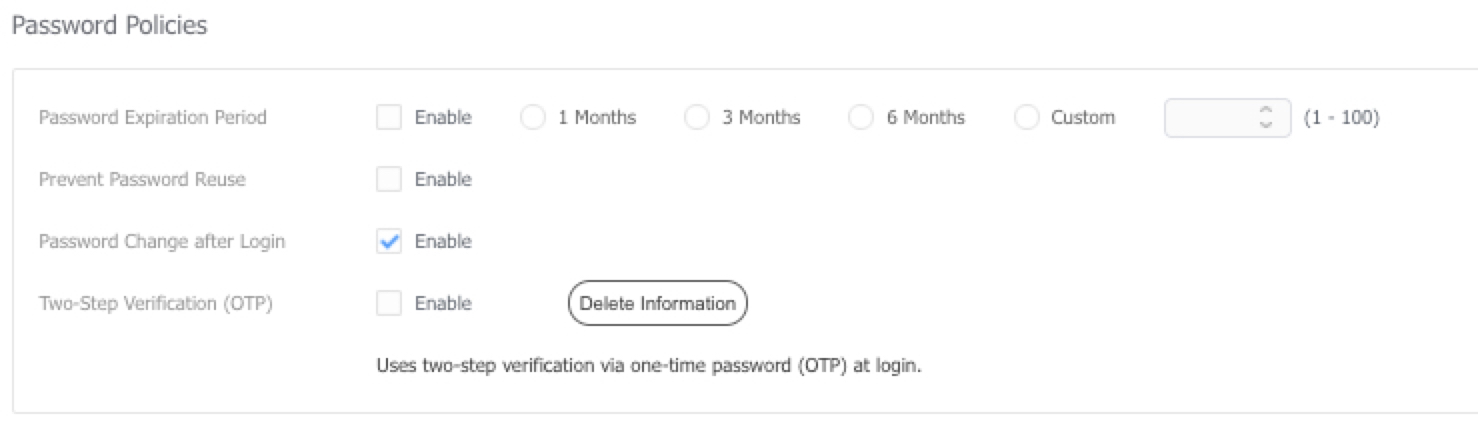
The following options are available:
- Password Expiration Period — the time after which a user must set a new password. Choose one of the preset periods or Custom; when you choose Custom, a value must be entered.
- Prevent Password Reuse — stops users from setting a password they have already used before.
- Password Change after Login — when an administrator assigns a user a new password, the user is prompted to replace it with one of their own at the next sign-in.
- Two-Step Verification (OTP) — requires every user to enroll an authenticator app and enter a one-time password at each sign-in.
For the OTP enrollment procedure and version-specific behavior, see Two-step verification (OTP) and the two-factor authentication FAQ.