Adding a Streaming URL
A live stream is registered in MagicINFO Server as a streaming content item that points to the stream's URL. Once registered, it can be scheduled like any other content.
Check protocol support
Before you begin, verify that the stream uses a protocol the target player type supports:
| Player type | Supported protocols |
|---|---|
| I-Player | MMS, RTP, RTSP, HTTP |
| S3 / S4 / S5 / S6 / S7 / S9 / S10 | MMS, RTP, HLS, HTTP |
Step 1: Create the streaming item
Sign in to the MagicINFO Server web console, open the Content page, click New, and select Streaming.
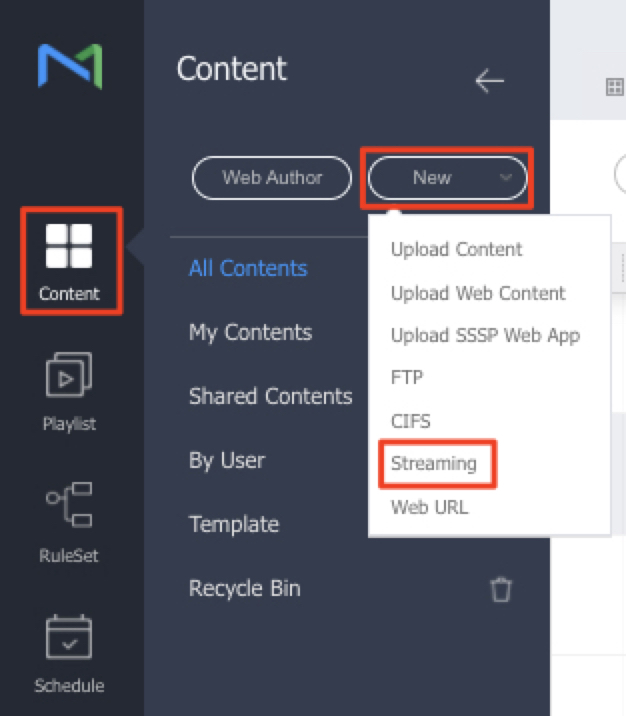
Step 2: Enter the stream details
The dialog lists the supported protocols. Give the stream a name and paste the stream URL into the Address field, then save.
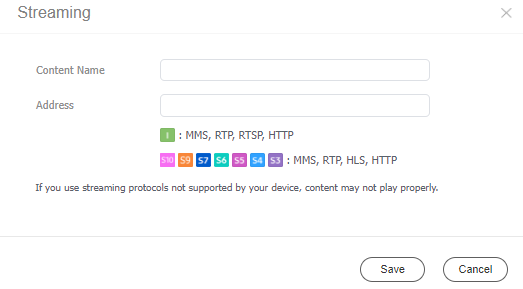
Step 3: Schedule and publish
The streaming item now appears in your content list. Add it to a playlist or place it directly in a schedule, then publish to your display — see the media publishing quickstart.