Activating a License Key
A purchased MagicINFO Server license is activated from the License Info page. Use 1st-Time Activation for a new license key, and Additional Activation to apply a quantity upgrade to a key that is already active.
First-time activation
-
Sign in to the MagicINFO Server web interface with a server administrator account.
-
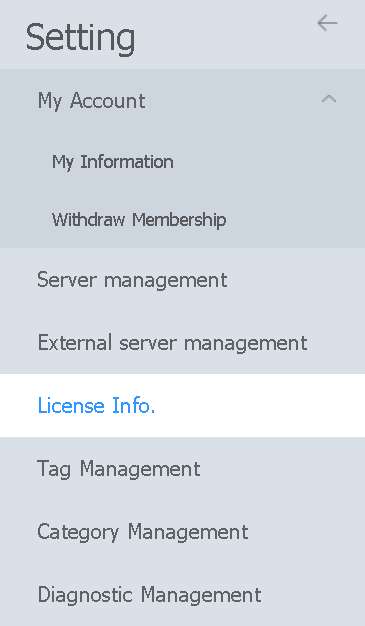
Click Setting in the menu bar on the left side of the screen.
-
In the Setting menu, click License Info.
-
Click 1st-Time Activation.

-
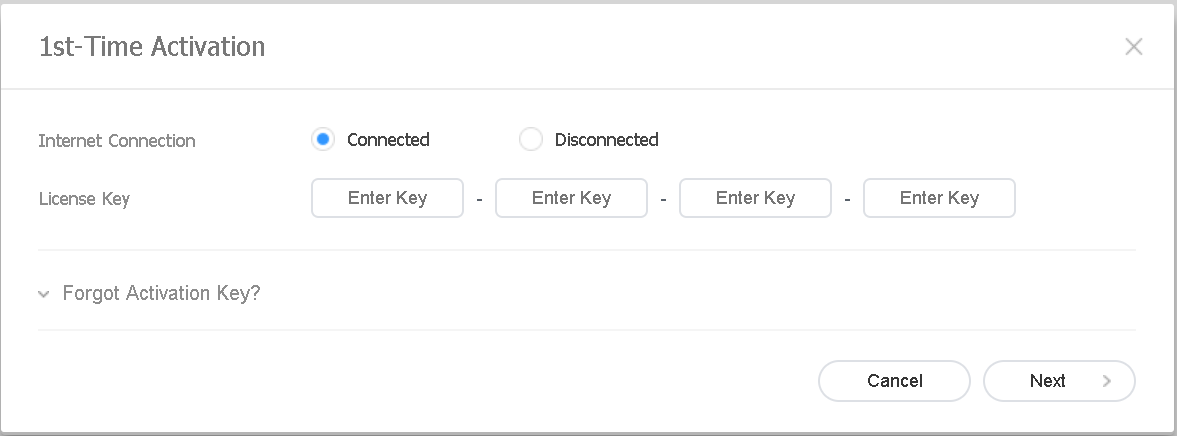
In the dialog that opens, set Internet Connection to Connected and enter your license key in the License Key fields.
-
Click Next.
-
Fill in your company details and click Save.
The license is now active and appears on the License Info page.
Additional activation (quantity upgrade)
When you have purchased extra device capacity for an existing license:
-
On the License Info page, select the license key you want to upgrade.
-
Click Additional Activation.

-
Enter the new license key you received and click Next.
The device quantity of the selected license is increased accordingly.
For evaluating MagicINFO before purchase, see Activating a free trial license.