Display Control Tab: Panel and Input Source
The display-related items of the device can be set and modified. Click the Display Control tab from the edit device info window.
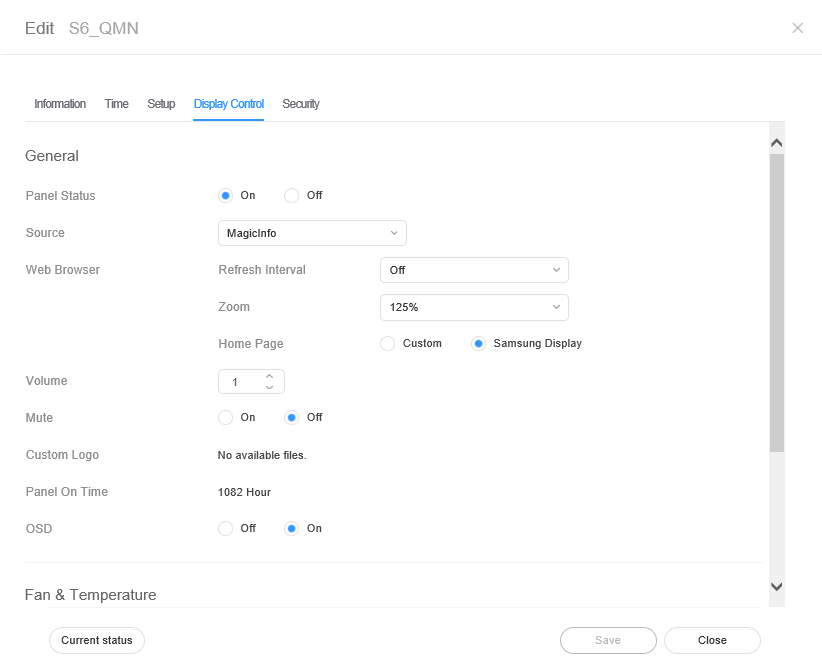
| Item | Description |
|---|---|
| General | Display Panel: Turn the display panel of the device on or off. Input Source: The input source of the device can be changed. Web Browser: Configure the web browser refresh interval, zoom and website settings. Volume: Enter or change the volume of the device. Mute: Mute or unmute the device. Custom Logo: Displays a custom logo or default content, instead of the Samsung logo. Panel On Time: View the time elapsed after turning the display panel on. OSD: You can set to make the items on the display panel appear or disappear. |
| Fan & Temperature | Current Temperature: View the current temperature of the device. Temperature Control: Enter the temperature. Control the device not to exceed the set temperature. |
| Click View More to view or modify additional information. |
In practice
- The values on this tab are the last ones the server read from the display, not live. They refresh on a forced live read or when the display reconnects, so an old value after a change usually means "not re-read yet".
- A display that has just woken from standby can report a change as successful without applying it. Check again a few minutes later.
- Among the advanced settings under View More: Remote Configuration is the newer name for Network Standby (the display stays reachable while off), Max. Power Saving off keeps the panel on through a brief loss of signal, and Auto Source Switching off stops it hunting for an empty input.