Device Settings Tab: Time Zone, DST and More
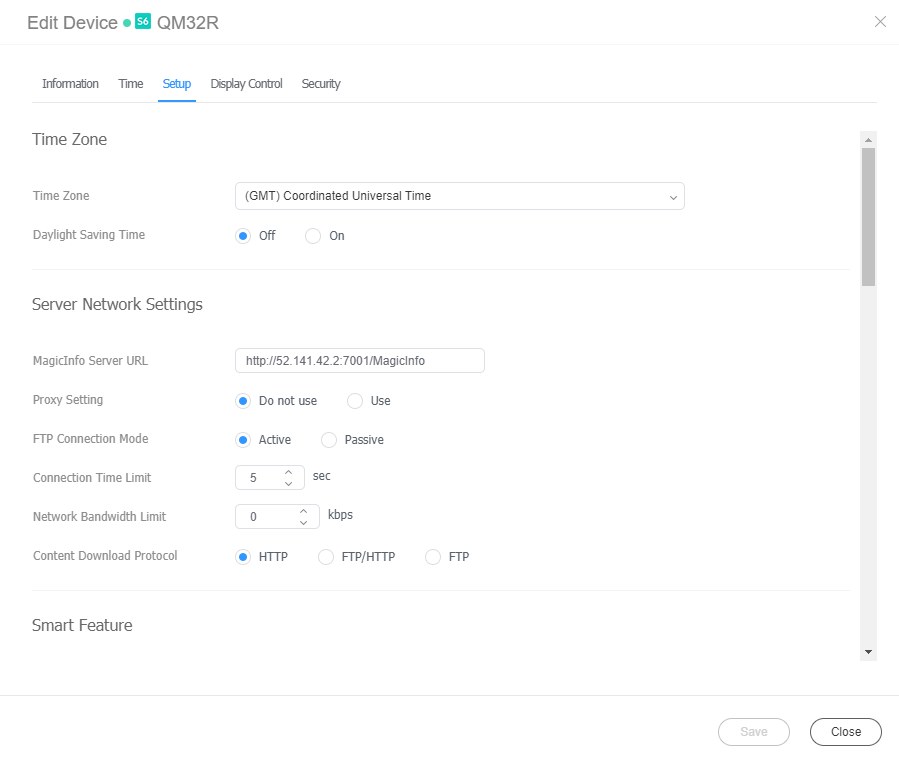
Change the major settings for device management. Click the Settings tab from the edit device info window.
| Item | Description |
|---|---|
| Time Zone | Time Zone: Select a time zone for each city. Daylight Saving Time: Turn daylight savings time mode on or off. To use daylight savings time mode, configure start and end settings. |
| Server Network Settings | MagicINFO Sever URL: Set the address of MagicINFO Server. Proxy Setting: Enable or disable the proxy server. Edit the settings if required. FTP Connection Mode: Select the FTP connection mode. Connection Time Limit: Set the time to limit connection to the server. Network Bandwidth Limit: Set the network bandwidth to limit the network traffic. |
| Smart Feature | Smart Download: Turn on or off the Smart Download mode. |
| Period | Triggering Interval: Set the triggering interval. Monitoring Interval: Set the monitoring interval. Screen Capture Interval: Set the screen capture interval. The range is 1 to 180 minutes. PDF Conversion Interval: Set the time interval for each device to switch to another page in a distributed PDF document. This option is available when the document contains more than one page. Office Conversion interval: Set the time interval for each device to switch to another page in a distributed Office document. This option is available when the document contains more than one page. System Restart Interval: Set the interval for restarting the system. You can set up to the day and time. |
| ETC | Screen Rotation: Turn the screen rotation mode on or off. |
| Manage | Proof of Play Management: Manage the content’s play records on the device. Validity: Set storage period for playback logs. Valid Size: Set storage size for playback logs. Last Check Time: Display the time of last access to playback logs. Refresh: Update a list of playback records. |
| Content Download Status | Setup: You can set to download the content only from the Edge Server. Interval: Set content downloading intervals. Job Unit: Set the unit for download intervals to seconds or percentage. Download Mode: Configure settings so that specific or all content items are downloaded. |
| Edge Server | - View the name and IP address of the edge server and the devices connected to the server. |
| PIN Code | Set the device password (PIN code). |
In practice
- Monitoring Interval also decides when the console calls a screen Disconnected: no completed check-in for interval + 1 minutes, so 11 minutes at the default of 10. See why a playing screen can show Disconnected.
- Daylight saving is added on top of the zone. Pick the city whose standard (winter) offset matches the site and turn DST on; picking the summer offset and DST as well puts the screen an hour ahead.
- Change MagicINFO Server URL while the display is awake. A display changed in standby can store the new address yet keep using the old server until it restarts.