Device Information Tab: Name, MAC and IP
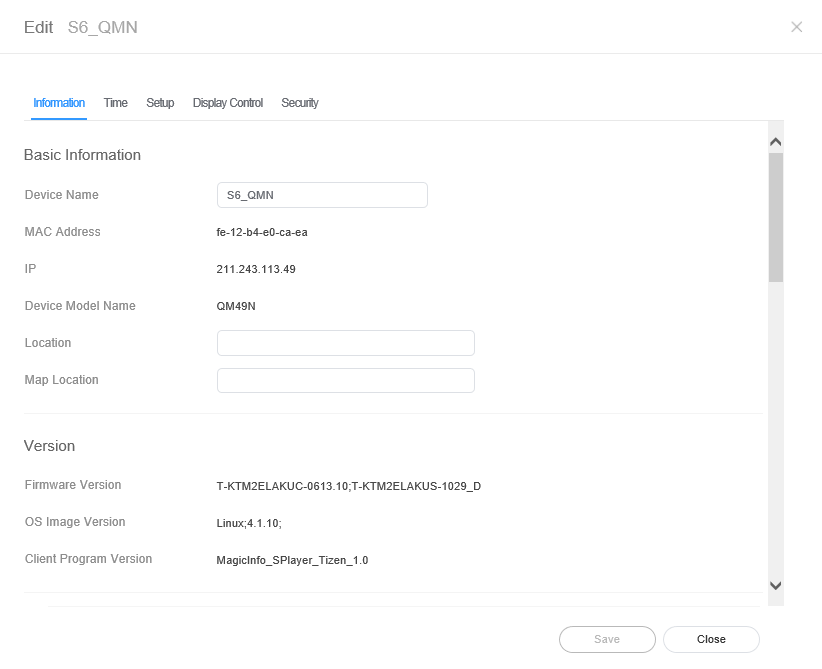 Click the Information tab from the edit device info window.
* marked items can be entered or modified by an user.
| Item | Description |
|---|---|
| Basic Information | - *Device Name: Change a device name. MAC Address: View the MAC address of the device. IP: view the IP address. Device Model Name: Edit the device model name. - *Location: Enter the device position. - *Map Location: Enter the map location of the device. |
| Version | Firmware Version: View the device's firmware version. OS Image Version: View the device's OS image version. Client Program Version: View the device's client program version. |
| System | CPU: View the device CPU information. Memory Size: View the device memory capacity. Storage Size: View the storage size of a device. Video Adapter: View the device's graphics card information. Video Memory: View the device's graphics memory capacity. Video Driver: View the device graphics driver information. |
| Storage Size | Used Storage Space: View disk space in use. Available Capacity: View available disk space. To acquire available capacity of the device, select Empty Storage and then click the Save. Among the contents stored on the device, the content that is not playing or not included in the schedule can be deleted. |
| ETC | Approval Date: View the approved date for the device. Screen Size: View the device screen size. Resolution: View the device screen resolution. Code: View the device code. Serial Key: View the device's serial key. |
In practice
- IP is the address the display has on its own network, usually a private one behind a router, not the public address it reaches the server from. A mobile-broadband address here usually means a 4G uplink, and those reconnect slowly after a reboot.
- A Client Program Version ending in
;FWVerUpdatedmeans the display reported a firmware change. If that display accepts a publish but never downloads, power-cycle it; no server setting fixes it. - Some models with a limited built-in client, such as the OH55A-S outdoor display, leave Firmware Version blank. That is normal for them, not a reporting fault.