Editing pages
In Web Author, a single content can have various contents per page.
Adding pages
Click  (Add Page) on the Web Author editing page.
Managing pages
- Click
 (Page List) on the Web Author editing page.
- When the page management window appears, manage the page by using available functions.
Available functions are as follows:
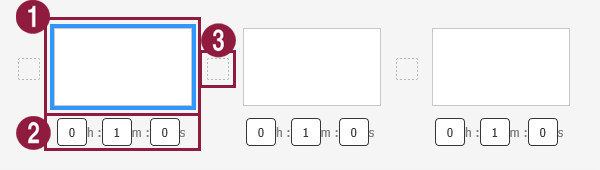
- View added pages as thumbnails.
- To change the playback sequence of a page, click and drag the page to a desired position.
- To delete an added page, place the mouse cursor on the page and then click
 icon.
- Set playback time for each page. Set the time by selecting it from the list or by manually entering the time.
- Add page transition effects. Select a transition effect.
- The page transition effect can be used only when the selected device type is I Player or W Player. The effect may appear different depending on the device type.
- The page transition effect will not be available if you select VideoWall as the device type.