Connecting I Player to the Server
I Player runs on Windows and is configured through the MagicINFO icon in the notification area of the taskbar. To register the player with a MagicINFO server, enter the server address in the Basic setup menu, then verify the same values in the Advanced setup menu.
Open the Basic setup menu
-
Right-click the MagicINFO icon in the lower-right corner of the screen and select Setup > Basic.
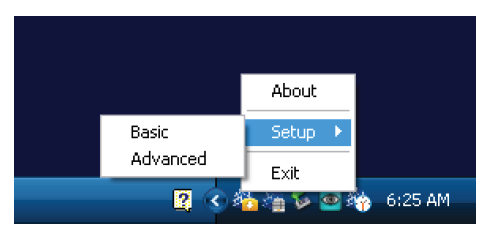
-
Enter the setup password. The factory default is
000000(six zeros).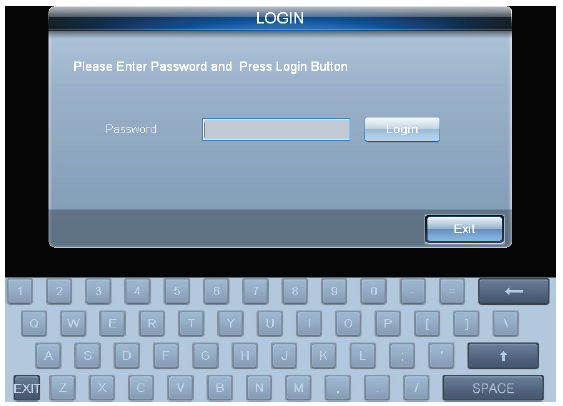
Enter the server address
-
Open the Server tab and select Access MagicInfo Server periodically.
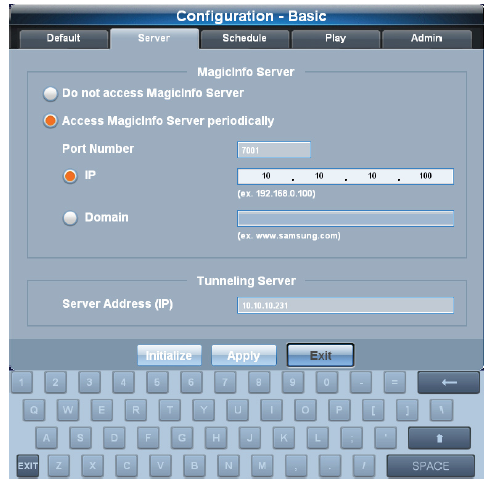
-
Fill in the connection details:
- Port Number:
7001(use7002when the server connection runs over SSL) - IP or Domain: the address of the MagicINFO server
- Port Number:
-
Click Apply.
Verify the Advanced setup
-
Right-click the MagicINFO tray icon again and select Setup > Advanced. The password is the same default,
000000. -
In the tree on the left, go to Server > MagicInfo Server and confirm the same port number and server address are set.
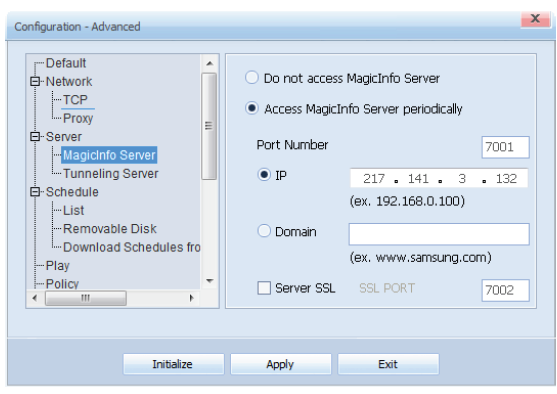
-
Click Apply.
On older Samsung SBB players, click the WMF icon on the desktop after changing the configuration — this step is required to save the settings.
Once the player reaches the server, it appears in the unapproved device list. See Approve New Devices from the Unapproved List for how to approve it.